

Why domain changes break communities (and how to fix it)
For publishers, a domain change isn’t just a technical move — it’s a disruption to the community that has grown around your content. When readers participate in discussions, they’re investing in the value of your platform. Losing that history during a domain transition means losing trust, engagement, and even SEO value.
Other comment platforms have left publishers stuck: comments remain tied to the old domain, invisible on the new site even after 301 redirects. That’s why we built a self-service domain migration tool — so you can move your entire discussion history safely and independently.
What’s new: migrate on your terms
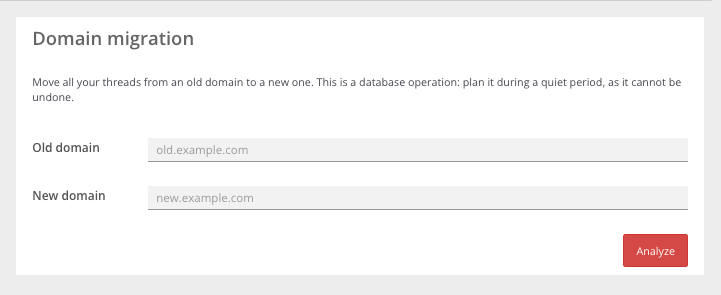
Access the domain migration tool directly from your GraphComment back-office (or through the updated WordPress plugin). No need to contact support. Three simple steps, full control, zero downtime.
1. Scan before you migrate
Enter your old and new domains. GraphComment automatically audits your site for all domain variations — www., blog., AMP, mobile versions, and more. You get a full report: number of pages and discussions affected, list of domains detected, and warnings if any pages lack proper redirection.
2. Select with confidence
All detected domains appear as checkboxes. Your source domain is locked (it must remain the reference), but you can choose which variants to migrate. A real-time counter shows how many discussions will be moved — for example, consolidating mobile and desktop versions under one domain. You decide exactly what to transfer.
3. Migrate safely in the background
After validation, re-type your new domain and confirm that you’ve set up a 301 redirect from the old domain. The migration runs in the background, with no service interruption for your readers. You track progress in real time and receive a final report once complete.
During migration, new comment publishing is paused for a few minutes to ensure data integrity. No discussion is lost: comments from merged pages are automatically attached to the main discussion thread.
Why this matters for publishers
This tool addresses core challenges for online media and blogs:
- Maintain SEO value: Search engines index pages with their comment history, reinforcing relevance and rankings.
- Preserve community engagement: Readers find their discussions and continue interacting seamlessly.
- Save time and resources: No need to request manual migration or rebuild discussion threads.
- Control the process: You choose what to migrate and when, minimizing risk.
Real-world use cases
A regional magazine migrates from localnews.fr to regionaljournal.com. With self-service migration, it transfers 12,000 discussions in under 15 minutes — without losing a single interaction.
A tech blog moves to a shorter, international domain (techblog.fr → tech.io). It selectively migrates only discussions from top-performing articles, while keeping archives intact.
How to get started
Domain migration is available now for Expert and Custom plans. Free users can see the “Domain Migration” tab in settings but it’s locked — simply upgrade your plan to unlock.
To activate:
- Go to your GraphComment back-office or the GraphComment tab in your WordPress admin.
- Click “Domain Migration” in settings.
- Follow the three steps above.
Need help? Check our step-by-step guide or contact our technical support team.